AI Listing Tool for eBay: The Complete 2026 Guide for Sellers Using Automation and Image-Based AI
A practical 2026 guide to AI listing tools for eBay. Understand image-to-listing workflows, category accuracy, item specifics, pricing drafts, and what to review.
December 5, 2025

eBay AI Listing Generator Guide 2026: How Image-Based Automation Changes Listing Creation
The way eBay sellers create listings is changing fast. What used to be a manual, repetitive workflow is increasingly being replaced by systems that identify products, write titles and descriptions, fill item specifics, and structure a complete listing draft in seconds. In 2026, an AI listing tool for eBay is no longer a novelty. For many sellers, it is becoming the default starting point for how listings get built.
This guide explains how these tools actually work, what they can and cannot do, and how image-based AI is reshaping the listing process from the moment you upload a photo. It also takes a neutral approach. Cavio AI, the image-driven listing technology inside MyListerHub, is mentioned only as an example of how modern tools operate today.
If you want to understand exactly what an AI listing generator does, when you should use one, and how it can affect visibility and sell-through, this guide will give you the full picture.
What an AI Listing Tool for eBay Does
An AI listing tool for eBay is software that uses image analysis and structured data to automatically generate listing drafts, including categories, item specifics, titles, descriptions, and pricing suggestions.
At its simplest, an AI listing tool automates many of the manual steps sellers take every time they create a listing. Instead of typing a title, searching for the correct category, filling out dozens of item specifics, and writing a description, much of that work is handled automatically.
In practice, this means sellers spend less time typing and more time reviewing. That speed matters because listing output and consistency often influence store momentum. When you can publish more consistently without sacrificing accuracy, you create more opportunities for impressions, clicks, and conversions, especially when you are working through large batches of inventory.

To understand the real-world listing problems sellers still face and why automation matters, read Challenges eBay Sellers Still Face and Ways to Solve Them
How eBay AI Listing Generator Works Behind the Scenes
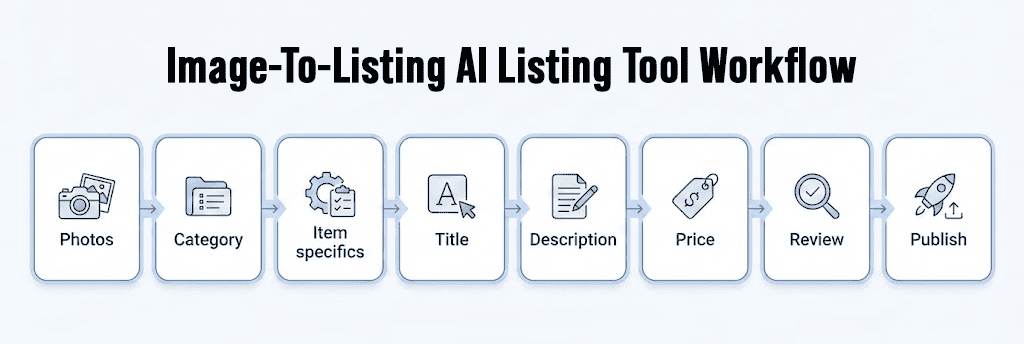
When sellers hear the phrase “eBay AI listing generator,” they sometimes imagine a simple text-writing tool. The reality is more layered. Listing-generation AI typically works as a pipeline, and most of that pipeline is invisible to the user.
The first step usually begins with images. Modern AI models analyze the product’s shape, material, color, visible features, and distinguishing details. The system will interpret a brake rotor differently than it interprets a diamond pendant, a designer handbag, a vintage action figure, or a car part. From there, the model predicts the most likely category and builds a structured set of attributes around that category.
This structured data is the engine that powers everything else. Titles are created from the attributes that matter most to buyers in that category. Descriptions are drafted from the same attributes and refined into clear, readable text. Item specifics are filled because the AI already extracted that information during image analysis.
Pricing suggestions are typically based on recently sold listings, category averages, and competition density, giving sellers a starting point rather than a final answer. Some tools are stronger than others here, but the best ones treat pricing as a guided recommendation that still needs a seller’s review.
By the time the seller sees the listing, most of the draft work is already done. The seller’s role is to review the suggested data, adjust details where necessary, add anything unique, and approve the final draft. High-volume sellers benefit the most because this workflow can collapse hours of typing into a short review process.
To go deeper on how sellers should think about pricing and when to adjust it, read How to Price Your eBay Listings for Profit
The Practical Benefits of AI Listing Software for eBay
The value of AI listing software for eBay is not only speed. The deeper benefits come from accuracy and consistency. AI tends to produce titles that follow a consistent structure, prioritize meaningful keywords, and avoid unnecessary filler. Item specifics often become more complete because the AI fills them systematically rather than selectively. That matters because missing specifics are one of the most common reasons listings underperform in search and filters.
AI can also reduce errors, both the obvious ones like typos and the hidden ones like forgetting an attribute buyers frequently filter for. Over time, this consistency can improve conversion and buyer trust, because shoppers can more easily confirm what they are purchasing before they click.
Another major benefit is the shift in workflow. Sellers who once relied on typing everything manually can focus more on quality control, sourcing, and store strategy. This makes scaling easier. It also helps teams produce consistent drafts faster, since the AI handles the most repetitive and technical parts of listing creation.

To learn more about how to refresh stale listings and bring dead inventory back to life, read how to Optimize Stale Listings on eBay and Boost Visibility
How AI Helps Sellers Select the Right eBay Category
One of the most time-consuming parts of creating an eBay listing is choosing the correct category. Sellers often underestimate how much impact this decision has on visibility, impressions, and compliance. In many cases, sellers spend minutes clicking through category trees just to find the closest match. Others rely on the category eBay suggests during listing creation, assuming it is always accurate.
While eBay’s suggestions are often correct, they are not perfect. There are edge cases where eBay recommends a category that looks reasonable on the surface but performs poorly in search or places the item in the wrong buying context.
Auto parts are a common example. The same product can be incorrectly listed under ATV Parts or even Business & Industrial instead of the correct Car & Truck Parts category. When this happens, the listing may still go live, but it is shown to a different buyer audience. Filters may not behave the way buyers expect, impressions can decline, and the listing can quietly underperform without an obvious error message.
Jewelry listings face similar issues. Engagement rings are sometimes placed in Fine Rings or Fashion Rings depending on how the seller navigates the tree. While these categories appear closely related, they can attract different buyers and use different item-specific filters. A ring listed in the wrong category may miss high-intent shoppers who rely heavily on filtering.
In more serious cases, incorrect categories can trigger listing errors, compatibility issues, or policy warnings, especially in categories with stricter requirements such as auto parts, medical devices, or luxury goods.
This is where AI listing tools add real value. Modern AI systems analyze the product itself rather than relying only on seller input or generic suggestions. By identifying the product type from images and attributes, AI can recommend a category before the listing is published. This reduces guesswork, saves time, and lowers the risk of silent performance issues caused by miscategorization.
Tools like Cavio AI are designed to approach category selection this way, using image-based recognition and structured data to suggest categories aligned with how buyers search and filter on eBay. The seller still reviews the final choice, but the starting point is typically more accurate than manual trial-and-error.
Correct category placement does not guarantee a sale, but incorrect placement can quietly prevent one. Over time, category accuracy becomes one of the simplest ways to improve listing performance without changing price, photos, or descriptions.
When and How Sellers Should Use Image-Based AI Listing Tools for eBay
An image-based AI listing tool makes the most sense when sellers list frequently, manage larger batches of inventory, or operate in competitive categories where titles, item specifics, and pricing directly affect performance. It is especially valuable when significant time is spent rewriting titles, manually entering item specifics, or maintaining consistent formatting across an entire store.
How much a seller can rely on AI output depends less on the category itself and more on the AI model behind the tool. Many image-to-listing tools on the market are built on fast, low-cost models that prioritize speed over depth. These tools often generate listings that appear acceptable at first glance but contain generic, inaccurate, or incomplete details upon closer review.
Some AI tools are also optimized for a narrow range of categories. A model trained primarily on apparel may perform well for clothing but struggle with categories like auto parts or jewelry, where attributes are more technical and category accuracy has a greater impact on visibility. This is why sellers sometimes see inconsistent results depending on what they are listing, even when using the same AI tool.
Another common source of weak output is the way general AI chat models are used. Uploading a few images and asking for a title, description, item specifics, and price with a basic prompt often leads to predictable results. Without structured logic and category-specific context, the output reflects the prompt quality more than the product itself. This is a classic case of garbage in, garbage out.
In these situations, AI should be treated as a foundational structure rather than a finished listing. The most effective workflow is to let AI generate the framework, then review and refine key details such as category placement, condition, and pricing before publishing.
Cavio AI is designed to reduce these limitations. It uses a more advanced reasoning model and applies category-specific logic rather than relying on a single generalized approach. In addition to analyzing images, Cavio AI cross-references your inventory and relevant online listings to generate more accurate drafts for condition, quantity, and pricing. This allows the system to handle most of the listing creation work automatically.
For sellers, this means Cavio AI completes roughly 99% of the draft work, while the seller focuses on reviewing accuracy, confirming details, and submitting the listing. The goal is not to remove human judgment, but to eliminate repetitive work and reduce errors caused by manual guesswork.
Why Image-Based AI Listing Tools Produce Different Results
Once sellers understand when image-based AI listing tools make sense and how much they can rely on AI output, the next question is why results vary so widely between tools. In most cases, the difference has little to do with AI as a concept and everything to do with how the tool is built. Not all AI listing tools approach image analysis, data structure, or listing creation the same way.
Sellers often assume all AI tools work similarly, but in practice, they fall into three categories with different strengths and limitations.
The first category is eBay’s built-in AI lister. It can generate titles, descriptions, and some item specifics from a photo, making it convenient for casual sellers or single listings. However, it is not designed for scale. It does not integrate with inventory, templates, or broader store operations, nor does it support bulk workflows.
The second category includes general-purpose AI tools, such as using ChatGPT to rewrite titles or generate descriptions. These tools can be flexible and useful for wording, but they do not generate item specifics, do not map categories accurately, and cannot produce a fully structured listing. They assist with text, not listing creation.
The third category is dedicated to eBay AI listing software, which is where most professional sellers find the greatest value. Tools in this category analyze images, build structured data, generate full listing drafts, and integrate with store operations. Cavio AI is an example of this type of technology. Its role is to identify the product from images, build accurate data around it, and produce a ready-to-review listing draft. Sellers still control the final details, but they no longer start from a blank listing.
For eBay’s own announcement about its image-based AI bulk listing experience, read about eBay Magical Listing Tool
How to Choose the Right Image-Based AI Listing Tool for Your eBay Store
Once sellers understand why different AI listing tools produce different results, choosing the right one becomes less about popularity and more about alignment with their workflow. Category accuracy is the most important factor. If a tool consistently selects the wrong category, visibility can drop immediately, even if the rest of the listing looks correct.
Image recognition quality also matters, especially for sellers who want to upload photos and let the system identify the product without manual input. Item specifics are another critical factor. Many tools can generate text, but far fewer can fill structured data correctly. This is especially important in categories like auto parts, jewelry, electronics, and fashion, where item specifics directly influence buyer filters and search visibility.
Pricing intelligence can also affect results. Some tools rely on generic AI predictions, while others incorporate real market signals. Bulk listing capability becomes essential for high-volume stores, as does template support for maintaining consistent branding across descriptions.
Finally, integration with the rest of your operations, including inventory, orders, messages, templates, and business policies, determines whether the tool simplifies your workflow or creates extra steps. A strong image-based AI listing tool should reduce manual effort without introducing new complexity.
Do AI Listing Tools Improve Search Ranking on eBay
AI itself does not boost ranking. eBay does not reward or penalize a listing simply because it was generated by AI. However, AI can indirectly improve visibility by helping sellers publish more accurate, complete, and relevant listings more consistently.
Titles drafted by AI often match buyer search phrasing more closely. Item specifics are more complete, which can improve filter performance. Categories are selected more accurately, which strengthens relevance. Pricing suggestions can help sellers start closer to the market. And listing output becomes easier to maintain at a steady pace.
In other words, AI improves many of the inputs that affect listing performance, not the ranking system itself.
To learn why listings still don’t get views even when sellers “do everything right,” read Common Mistakes Why Your eBay Listings Still Aren’t Getting Views
What Image-Based AI Looks Like in Practice
To understand the value clearly, imagine uploading a batch of auto parts, jewelry pieces, or apparel items.
In an auto parts scenario, an image of a control arm or headlight assembly can trigger the AI to identify the part type, suggest a compatible category, extract key attributes, and present a structured set of item specifics that the seller can refine. Jewelry sellers can upload photos of rings, pendants, or bracelets and receive quick suggestions for metal type, style, gemstone details, and category. Fashion sellers benefit from automatic color, size, style, and gender detection, while collectible sellers may receive predictions tied to brand, era, and series.
In each case, the listing goes from a blank page to a nearly complete draft in seconds, before the seller types a single word.

Common Mistakes Sellers Make With Image-Based AI Listing Tools
Even strong AI tools benefit from careful use. Problems usually occur when sellers upload unclear or inconsistent photos, skip the review step, or rely entirely on AI for pricing without verifying the real market.
Descriptions sometimes need a quick adjustment to match the seller’s tone or to clarify condition, wear, or imperfections. In categories like luxury goods, antiques, or rare collectibles, sellers should always confirm specifics manually, since subtle details can be hard for any AI to interpret from images alone.
AI is powerful, but accuracy ultimately comes from pairing automation with informed review.
Where Cavio AI Fits Into Today’s eBay Workflow
Cavio AI serves as an example of how modern image-based AI listing tools operate. It analyzes photos, identifies the product, generates attributes, fills item specifics, and drafts titles and descriptions. It does not replace the seller’s judgment, but it establishes a foundation that speeds up and standardizes listing.
Sellers who adopt this workflow shift from manual creation to rapid supervision, which is better aligned with the pace of eBay selling and the realities of scaling inventory.
To see the workflow live and ask questions about your category, book a demo here
Frequently Asked Questions
Does eBay have an AI listing generator?
Yes. eBay has built-in AI features that can help generate parts of a listing from photos, such as titles and descriptions. For many sellers, it is a useful starting point, but high-volume workflows often require tools that produce structured item specifics, support bulk drafts, and fit into a broader operational process.
Do AI-generated eBay listings rank higher in Cassini?
AI itself does not increase ranking. What improves performance is the quality of the listing inputs, including correct category placement, complete item specifics, relevant titles, competitive pricing, and consistent listing activity. AI helps sellers produce those inputs faster and more consistently, which can lead to better visibility and conversion over time.
Final Takeaway
Image-based AI listing tools are becoming a standard part of modern eBay workflows because they remove repetitive listing work without removing seller judgment. The biggest gains come from faster drafts, more complete item specifics, and fewer category mistakes that quietly reduce impressions. The best results come when sellers treat AI as a draft engine and keep a fast review step before publishing. If you want to see what an image-based listing workflow looks like in practice, you can explore how Cavio AI generates draft listings from photos and decide whether it fits your store’s process.
To review plans and start your 30-day free trial, visit our pricing page

by Alon Dostov

by Alon Dostov
Get More eBay Seller Updates
Follow MyListerHub as a preferred source on Google and see more of our eBay seller news, guides, and industry updates.