Does 100% Item Specifics Really Boost eBay Ranking, or Just Make You Feel Productive?
Does filling 100% of eBay item specifics boost ranking? Learn what actually improves visibility, when specifics matter, and how to test it at scale.
February 27, 2026

The Truth About eBay Item Specifics: Accuracy Beats 100% Completion
If you’ve been selling for a while, you’ve seen it. That little “completion” meter in the listing flow creeps higher as you fill item specifics. It feels like progress. It feels like ranking insurance. And it’s easy to assume that 100% specifics equals better placement.
Here’s the contrarian take: hitting 100% is not the goal, and chasing it can waste time or even hurt you if you fill fields with junk. The goal is being searchable in the places buyers actually search. That usually means filling the right specifics, with the right values, in the categories where specifics actually drive filters and match quality.
eBay itself says recommended item specifics help visibility, especially when buyers use left-hand navigation filters. That’s true. But that statement does not mean “fill everything to 100% no matter what.” It means “complete the specifics buyers use.” There’s a big difference.
If you want a deeper breakdown of how visibility really works inside eBay search, read 10 Advanced Tips to Get More Views on Your eBay Listings
How eBay item specifics affect Best Match ranking and filtered search visibility
eBay search is a mix of query matching and buyer behavior. When eBay explains Best Match, they include factors like how closely the listing matches search terms, and also “how complete the listing is” and “the quality of your listing.” That’s broad, and it’s not a promise that the completion meter is a direct ranking lever. It’s eBay saying they can match better when the listing is complete and accurate.
Item specifics are structured data. They also power filters. If a buyer filters by Size, Color, Brand, Model, or Material, and you left that specific blank, you can disappear from those filtered results even if your title includes the word. That’s the real, measurable ranking impact most sellers feel.
This is why sellers argue past each other on this topic. One seller lists in categories where buyers hammer filters, sees a big lift after filling specifics, and concludes “100% specifics boosts ranking.” Another seller lists oddball parts, collectibles, or one-off items where filters barely get used, fills 30 extra fields, and sees no change. Both stories can be true.
Why “fill 100% of item specifics” is the wrong goal for serious sellers
The completion meter is a productivity trap. It rewards motion, not outcomes.
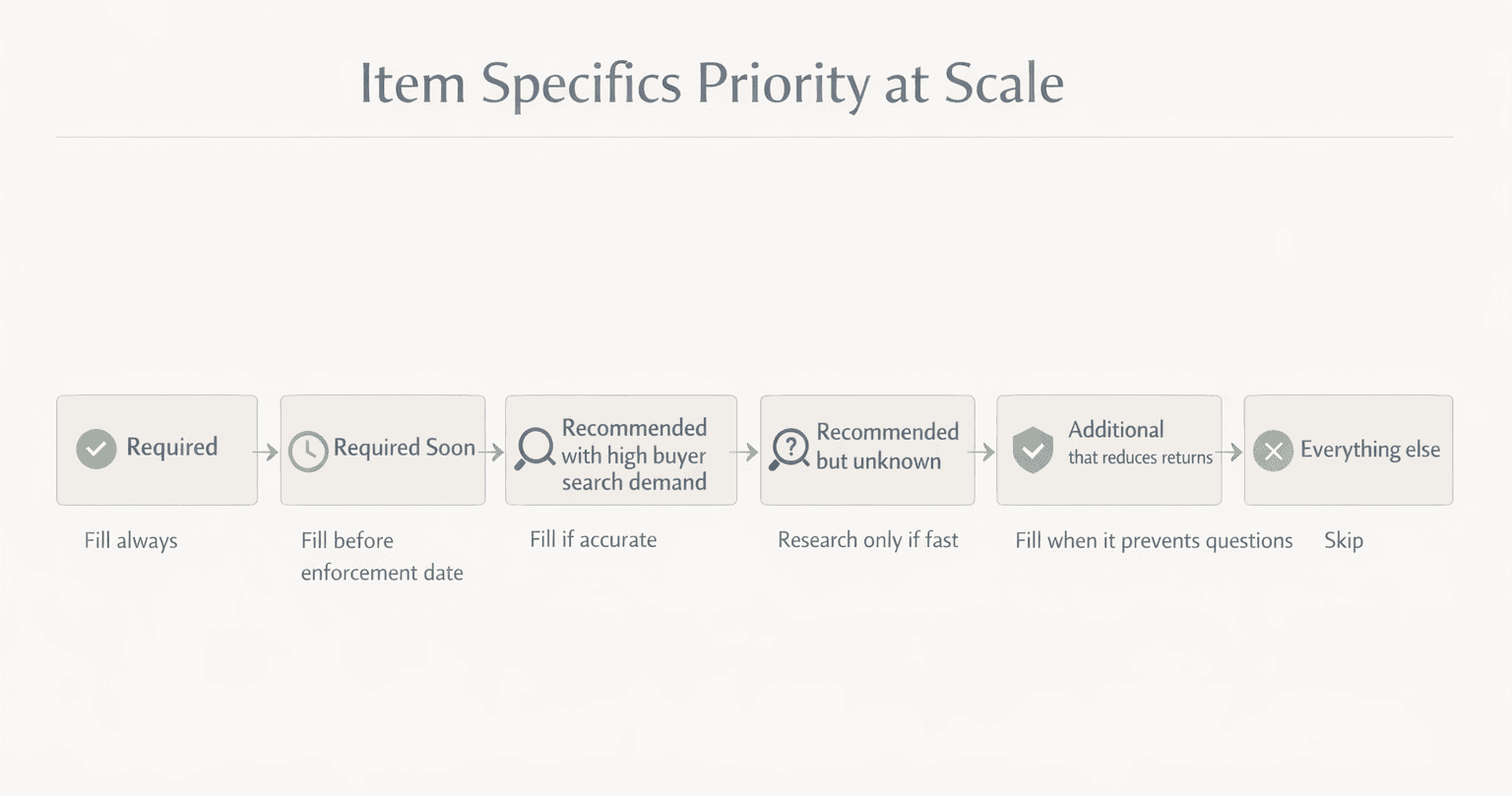
eBay labels specifics as Required, Required Soon, Recommended, and Additional. Required is non-negotiable. Required Soon is a landmine if you ignore it. Recommended is where the upside usually lives. Additional is often about reducing questions and returns, not necessarily ranking.
The mistake is treating all fields like they carry equal weight. They do not.
If you run hundreds or thousands of SKUs, time is your real cost. Every extra minute you spend chasing 100% has to pay you back in either more impressions, higher click-through, better conversion, fewer returns, or higher ASP. If it doesn’t, it’s busywork with a nice-looking meter.

When completing “recommended item specifics” actually moves the needle
Recommended specifics matter most when three things are true.
First, the category has strong buyer filtering behavior. Think apparel, shoes, electronics, and many home goods. Buyers are not scrolling 600 results. They filter fast. If you’re missing common filter fields, you’re invisible to the people most likely to buy. eBay directly points to recommended specifics improving visibility, “especially when buyers use the left-hand navigation filters.”
Second, eBay is telling you what buyers are searching for right now. In the listing flow, eBay shows search demand guidance for certain specifics based on recent searches. That’s not perfect, but it’s at least connected to buyer behavior rather than seller superstition.
Third, the specifics are clean and standardized. Dropdown values that match what eBay expects are more useful than custom free-text chaos. eBay’s developer documentation explains that some specifics are mandatory and that, in some cases, you must use eBay’s predefined names or values. In plain terms, eBay wants consistent structured data.
If your impressions are declining and you suspect freshness issues, this breakdown on Optimize Stale Listings on eBay: Proven Tips to Boost Visibility and Sales walks through what actually moves the needle.
When filling every optional item specific does nothing for ranking
There are also clear situations where filling to 100% is mostly noise.
If the listing is already showing up for the main queries in that category and the buyer path is not filter-heavy, adding extra specifics won’t magically leapfrog you over a stronger competitor. Best Match still cares about things like relevance, price, and overall listing quality. “Complete” is only one piece, and it’s vague on purpose.
If buyers do not use the optional specifics, they will not generate meaningful new traffic. They might help a little with long-tail matching, but you should treat that as a bonus, not a plan.
And if you’re filling optional fields with weak guesses just to fill them, you can make your listing less accurate. That can lead to bad clicks, lower conversion, and more returns. Search engines notice that stuff. Even if we don’t get to see the exact weighting, we all know what happens when traffic is mismatched.
The hidden downside: incorrect specifics can reduce conversion at scale
The biggest risk isn’t wasting time. The biggest risk is that you push the wrong buyers into the listing.
Let’s say you’re selling a men’s jacket and you pick the wrong “Size Type” or you guess on “Fit.” You might get more impressions, but they’re dirty impressions. Buyers click, realize it’s wrong, bounce, and you've just trained your listing to attract the wrong person.
Or you’re selling an electronics accessory, and you pick a model compatibility you are not 100% sure of. Now you get returns, INAD claims, and negative feedback. If you’re scaling, that’s not a small problem. That’s operational drag.
This is where the “100% completion” myth is actually dangerous. It encourages confident guessing. Guessing is fine when you’re listing one item for fun. It’s expensive when you’re managing a catalog.
Real examples of item specifics that matter vs specifics that are just filler
Here’s how this plays out in real workflows.
In shoes, missing Brand, US Shoe Size, Department, Style, and Color is brutal. Buyers filter hard. Completing those recommended specifics can push you into filtered results where the buyer is already halfway committed. That’s good traffic.
In men’s jeans, “Size” alone is not enough. Waist and inseam are core. Fit and rise can matter too. But if you don’t know the rise and you guess, you will pay for it in returns. Better to be honest and leave it blank than to invent data.
In used media, many optional fields don’t matter because buyers search by title, artist, edition, or ISBN/UPC. You should still fill in the structured identifiers and the obvious specifics, but trying to hit 100% is usually wasted motion. eBay’s guidance around product identifiers and item specifics is about helping buyers find the item on eBay and externally, but that doesn’t mean every optional field is worth your time.
In auto parts, specifics can matter a lot, but only if you’re using them correctly. Wrong compatibility data is a return factory. If you can’t validate fitment, the safe play is to focus on the specifics you can prove and make the rest crystal clear in the description.
How to audit item specifics without drowning in busywork
The practical boundary I use is simple.
Fill every Required field, always. If you don’t, you’re either blocked from listing or you’re sitting on a ticking “Required Soon” enforcement change that can create visibility problems later. eBay is explicit that they periodically add new Required item specifics and show “Required Soon” with enforcement dates.
Then, fill Recommended fields when you can do it accurately and quickly, especially when the values come from your item itself or from a reliable source like the label, the model plate, the packaging, or the catalog data.
For Additional fields, treat them like a conversion and return reducer. If a field answers a buyer question that otherwise causes messages, hesitation, or returns, it’s worth filling. If it’s just a random attribute that doesn’t change buying decisions, skip it.
That approach gets you most of the upside without the “completion meter” trap.
How MyListerHub speeds up eBay item specifics without creating bad data at scale
Once you stop chasing 100% completion and start chasing accuracy, the next problem is obvious: doing it cleanly across hundreds or thousands of listings is a grind. That’s where MyListerHub is actually useful, because it’s built around workflow control for serious catalog sellers, not one-off listing “tips.”
Cavio AI is the fast path when you’re creating new listings. It generates a structured listing from product images, including item specifics, so you are not hand-typing the same fields over and over. The important part is not “AI magic.” It’s consistency. When you’re scaling, consistency is what keeps your catalog from drifting into random values that don’t match the way eBay expects data.
For existing inventory, the bigger win is cleanup and prevention. MyListerHub’s Error Detection & Bulk Fixing scans listings for missing item specifics and other structural issues that can quietly hurt visibility. That matters because item specifics aren’t static. Categories change, eBay updates requirements, and sellers (all of us) move listings around when we’re testing new categories or trying a different root. A system that flags missing specifics and supports bulk catalog correction is how you keep “listing health” from becoming a quarterly panic project.
If you’re importing or standardizing data, the Advanced CSV Upload with Mapping System is the other lever. It supports structured CSV uploads with advanced field mapping, which helps prevent formatting mistakes and keeps large imports controlled. In real seller terms, this is how you keep repeated specifics consistent across a whole department of inventory without relying on memory or manual entry. That’s the boring stuff that protects your catalog at scale, and it’s exactly where most “just fill 100%” advice falls apart.
A testing framework for proving whether more item specifics improve your ranking
If you want to stop debating and actually know for your store, test it like an operator.
Pick one category with at least 30 to 50 similar listings that have steady impressions. Don’t mix weird one-offs with common items. You want apples-to-apples.
Split them into two groups. Group A gets a clean pass where you fill in the most important Recommended specifics accurately. Group B stays as-is for now.
Then run a real window. For most categories, I like 14 to 21 days. Shorter than that and you’re often just measuring noise. Longer than that and you’ll forget what you changed.
Watch three metrics, in this order.
Impressions tell you if you’re getting surfaced more often, which often happens when you start showing up in filtered results. Click-through rate tells you if the traffic is relevant. Conversion tells you if it’s the right buyer. If impressions go up but conversion drops, you didn’t “improve ranking.” You widened visibility to the wrong audience.
This lines up with eBay’s own framing. They say complete and accurate specifics are likely to increase visibility and help buyers identify key product features. Visibility without a buyer match is not a win.
If you want to see more ranking myths broken down clearly, read Why Your eBay Listings Still Aren’t Getting Views: Common Mistakes and Myths Debunked
What to do when you have 2,000 listings and half are missing specifics
This is where theory meets scale.
eBay gives sellers several ways to identify missing required and recommended specifics, including tasks in Seller Hub, quick filters, and bulk tools such as downloading/uploading files for listings that are missing required, required soon, or recommended specifics. That’s eBay telling you this problem is common, and they expect bulk workflows.
At scale, your best move is to stop thinking “listing by listing” and start thinking “category by category.” The goal is to create a repeatable template in your head for what matters in that category.
This is also one of the few places where a tool mention actually makes sense. If you’re running thousands of listings, the pain isn’t understanding item specifics. It’s executing clean fixes without losing a weekend. MyListerHub’s Error Detection & Bulk Fixing is built to scan listings for missing item specifics and apply bulk corrections, which is exactly the bottleneck when you’re trying to clean up visibility issues across a large catalog.
Keep that bridge in the right place mentally: tools help you execute. They don’t decide what fields matter.

The decision line: Should you chase 100% item specifics completion?
So, does filling 100% of item specifics improve ranking?
Sometimes you’ll see more impressions after filling specifics, but that’s usually because you unlocked filtered visibility and improved match accuracy, not because the meter hit 100%. eBay directly ties recommended specifics to increased visibility, especially through filters, and they also frame complete listings as easier to match in Best Match.
The myth is thinking 100% is the lever. It’s not. Relevance and accuracy are the lever.
My boundary is clean and boring: fill Required and Required Soon. Fill Recommended when it’s accurate and connected to buyer filters or buyer search demand. Fill Additional only when it reduces questions, returns, or hesitation. Skip the rest without guilt.
That’s how you win this game at scale without turning your business into an unpaid data-entry job.
Common Questions eBay Sellers Ask:
Does filling 100% of my eBay item specifics boost ranking?
Not automatically. eBay rewards accurate and relevant specifics, not just a full meter. Missing Required specifics can limit visibility, and missing key Recommended ones can remove you from filters. But hitting 100% alone doesn’t guarantee higher placement.
Which eBay item specifics should I prioritize first?
Focus on the fields buyers actively filter by, like Brand, Size, Color, Model or Type, Department, Material, and compatibility when relevant. These control whether you show up once buyers narrow results, especially on mobile.
Can wrong item specifics hurt performance on eBay?
Yes. Incorrect specifics can increase impressions but attract the wrong buyers. That usually lowers conversion and increases returns. If you cannot verify a value from the item itself, do not guess just to fill the completion bar.

by David Green
