The Stale Listing Playbook for eBay Sellers in 2026
Stale listings on eBay killing your sales? Learn when to revise, relist, or end and sell similar using a clear 8-week diagnostic playbook for dead eBay listings and zero-engagement inventory.
January 2, 2026
Stale Listings on eBay: Relist vs Revise and When to End and Sell Similar
You’re in the right place if you clicked for a playbook and you’re staring at listings with zero views, zero watchers, zero offers, zero messages, and zero sales.
Those listings aren’t warming up for the right buyer. They’re not getting in front of buyers at all.
When listings sit at zero engagement, discounts and rewrites don’t fix the real problem. Dead inventory clogs your store, drags down your sell-through, and distracts you from what actually converts.
This is a diagnostic + action playbook for stale listings on eBay. Use it to make a clean decision today: leave it alone, revise it, or restart it.
Define “stale listing” (what it means here)
For this playbook, a “stale listing” means zero engagement in the last 8 weeks. Not lifetime totals.
Before you run the diagnostic, make sure your numbers aren’t lying to you. Sellers misclassify listings as “alive” because they rely on vanity totals or they accidentally manufacture activity. This playbook only works with clean, recent signals.
Page Views:
A listing can show thousands of lifetime views and still have zero real buyer activity recently. Third-party view counter tools can also be inflated by seller/staff checks, repeated refreshes, bots, and non-buyer traffic. And if you’ve posted the listing in groups asking people to click it, those clicks contaminate your data. It creates activity that looks like engagement, but it ruins your diagnosis.
Watchers:
Watcher counts can linger even when interest is gone. Some watchers are competitors monitoring pricing. Don’t protect a listing just because it has watchers, especially if it stopped producing new activity.
Sellers get emotional attachment to these misleading metrics and refuse to restart listings that clearly stopped producing. Here’s the mindset shift: your purpose is to sell products, not to collect watchers.
Sales history:
“X sold” across a long period can hide the fact that nothing has sold recently. A listing might show “100 sold” but if nothing has sold for 4+ months, that history doesn’t mean the current version of the listing is still performing.
Bottom line: this playbook runs on recent, buyer-quality signals. If your numbers are lifetime totals or artificially boosted, you’ll choose the wrong fix.

If you want the deeper breakdown of why eBay listings go invisible read here to learn more Why Your eBay Listings Still Aren't Getting Views
What a stale listing is NOT (and why)
Not “over 30 days old”:
Age is not the trigger. Plenty of listings are 60, 90, even 180 days old and still sell because they keep getting recent engagement. If a listing is getting views, watchers, offers, or messages, it’s alive, even if it’s old.
Not “slow selling”:
Some inventory is naturally long-tail. Niche parts, rare variants, higher-priced items, unique jewelry, and collectibles can take time to match with the right buyer. “Slow” means a smaller buyer pool. “Stale” means no engagement at all.
Not “priced too high by default”:
Price is a conversion lever. You can’t diagnose conversion until the listing is being seen. Dropping price on a listing nobody sees doesn’t solve the root issue. It just reduces margin.
Not "fully indexed yet":
A listing can have zero activity early and still be normal. During the first 21 days, treat “no traction” as an indexing/input problem. Improve title structure, category accuracy, and item specifics before you consider any restart.
Not "removed or hidden":
Some listings look dead because they’re not visible. eBay may remove or hide a listing due to policy or legal issues, a rights owner request, or other scenarios eBay outlines. If this happens, eBay sends the reason to your registered email and to Messages in My eBay. Other “not visible” cases include drafts, Time Away settings that pause sales, duplicate listing conflicts, and out-of-stock situations.
Bottom line: a stale listing is not “old” or “slow.” It’s a listing with zero engagement for 8+ weeks: no views, no watchers, no offers, no messages, and no sales.
One practical note: tracking offers and messages as part of “engagement” gets messy at scale if you’re working only inside eBay. You can see the activity, but it’s easy to lose the listing-level context over time. If you run a large catalog, a tool built to monitor listing health makes this playbook easier to execute consistently.
Side note (separate issue): If you use third-party listing counters or browser extensions, review what permissions they request. Some tools ask for access beyond what’s needed to count views. For a deeper breakdown of what to check, read: [link to your security/permissions article].
60-second stale listing diagnostic (before you touch anything)
Step 1: Confirm it’s truly zero engagement (last 8 weeks, not lifetime)
- 0 recent views (don’t use lifetime totals or third-party counter totals)
- 0 new watchers
- 0 offers
- 0 buyer messages
- 0 sales
If you used “click groups” to drive traffic, treat views/watchers as contaminated and don’t use them to judge health.
If you’re tracking buyer messages as a key engagement signal and it’s hard to stay organized, read hear to learn How to Improve Customer Communication on eBay and Increase Your Sales with MyListerHub
Step 2: Rule out removed or hidden listings (dead vs not visible)
Before you diagnose performance, confirm the listing is actually visible:
- Review Seller Hub alerts and eBay messages
- Check for non-active states (draft/ended/out of stock/Time Away pause)
If eBay removed or hid it, fix the cause first. Don’t restart it yet.
Step 3: Do a visibility smoke test (incognito)
Search in an incognito window using buyer identifiers:
- exact part number / MPN / model
- brand + key spec
- the most unique 4–6 words from your title
If you can’t find it by its identifiers, treat it as a visibility/input problem first.
Step 4: Check the three silent killers
If the listing should be findable but isn’t performing, check:
- wrong category
- missing or weak item specifics
- shipping/returns friction (terms that make buyers skip you)
The Stale Listing Playbook
Use these exact paths. Most sellers get stuck because they apply the wrong fix.
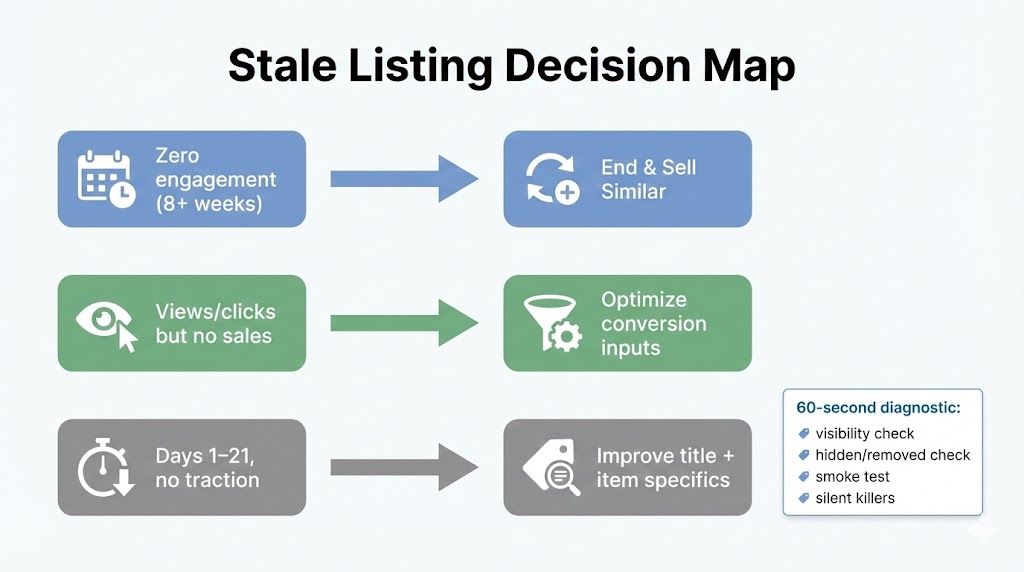
Zero engagement → End and Sell Similar
This path is for dead eBay listings: 8+ weeks of true zero engagement.
Why this path exists: if the listing has no engagement, it has no proof of life. Revisions are often wasted because you’re editing something buyers are not interacting with.
The mistake sellers make: cutting price first.
Cutting price on a listing nobody sees is negotiating with an audience of zero.
Views or clicks but no sales → Optimize photos, price, and listing details
This path is for listings that are being seen but not converting.
Why this path exists: views and clicks mean your listing is being surfaced and considered. That points to conversion inputs: photos, price logic, shipping, returns, condition clarity, trust signals, and details that remove buyer uncertainty.
The mistake sellers make: restarting a listing that is already alive.
If you have views, your job is not to reset. Your job is to convert the traffic you earned.
Recently listed, no traction → Improve title and item specifics
This path is specifically for the indexing window (Days 1–21).
Why this path exists: many listings start weak because the title is vague and the item specifics are thin. Buyers filter heavily, and missing specifics can keep you out of filtered results, which looks like eBay listings not getting views.
The mistake sellers make: treating “new and quiet” the same as “old and dead.”
A new listing with no traction usually needs better inputs, not a restart.
Deep dive: End and Sell Similar (most important section)
Sellers misuse “End and Sell Similar eBay” because they treat it like a magic button. It’s not. It’s a controlled reset for listings that have proven they are invisible.
Why revising alone does not help zero-engagement listings
Revising is useful when you already have signals. If a listing gets views, revisions can improve conversion.
But for eBay zero engagement listings, revisions usually fail because:
- you’re optimizing something buyers are not seeing
- the problem is foundational (category, specifics, title structure), not cosmetic
- you can’t measure improvement without traffic
If it’s truly stale, stop polishing. Restart it correctly.
Why a new item ID matters (practical explanation, no conspiracy)
The reason sellers use the eBay sell similar strategy is simple: “Sell similar” creates a new listing from an old one. It’s a standard workflow inside eBay’s bulk tools, not a trick.
In practice, it matters because you are:
- launching a fresh listing entity
- forcing a clean re-evaluation of your inputs
- breaking the cycle of endlessly editing a listing that has produced no engagement
Why a cooldown period matters
Most sellers end and immediately sell similar. That usually produces the same result because nothing meaningful changed.
A cooldown is not superstition. It’s operational discipline.
Use this simple routine:
- End the listing
- Wait 48–72 hours
- Use the time to make real improvements
- Sell similar and relaunch
Also, don’t obsess over instant visibility. eBay notes that when an item is relisted, it can take a few hours before it appears on the site. That’s normal.
Want a deeper walkthrough of running Sell Similar as a controlled process (not a panic button), including timing and testing? Read hear How to Use Automations to Refresh Old Listings and Increase Sales
Why a small price shift is useful
Price is not always the root cause, but it is always part of the buyer decision.
A small price shift helps because:
- it tests whether you were just outside a buyer’s acceptable range
- it can move you into a different filter band
- it prevents you from relaunching an identical offer and expecting a different result
Keep it controlled. This is not a discount spiral. It’s a test.
Clarify “refresh” terminology (because sellers mix methods)
Sellers say “refresh,” but they mean different actions:
- Revise: edit the current listing (same listing)
- Relist: bring back an ended unsold listing
- Sell Similar: create a new listing using the old one as a template
So when someone asks “how to refresh stale listings on eBay,” the correct move depends on which problem you have:
- true stale (8+ weeks, zero engagement): End and Sell Similar
- views but no sales: optimize conversion inputs
- new and quiet (Days 1–21): fix title + item specifics
When NOT to End and Sell Similar (guardrails sellers need)
This is where most sellers hurt themselves.
Do not End and Sell Similar if:
- the listing has watchers or steady views
- the listing has recent sales momentum or ongoing engagement that’s still converting
- you’re actively getting messages or offers, or you’re mid-negotiation
- it’s a multi-quantity listing where sold count helps conversion
- it’s still inside the 1–3 week indexing window
If the listing is alive, treat it like it’s alive.
The “first 72 hours after relaunch” checklist
After you relaunch, you need a fast feedback loop.
In the first 72 hours, watch:
- any views at all?
- any watchers?
- any messages or offers?
Interpretation:
- views start but no watchers: conversion problem (photos, price, shipping, details)
- still zero: visibility problem (category, title structure, item specifics, removed/hidden)
Common seller mistakes (if this feels personal, good)
This is why sellers get stuck with dead eBay listings.
- Cutting price on listings nobody sees: You’re trying to fix a visibility problem with a pricing lever.
- Rewriting titles that already get clicks: If you have views, the title is not the emergency. Your offer is.
- Relisting everything at once: You create chaos, you lose learnings, and you increase the risk of duplicates and operational mistakes.
- Letting dead listings sit for months: Either you’re waiting for it to magically wake up, or you’re avoiding the work. That’s emotional inventory.
- Running End and Sell Similar with zero improvements: Same photos, same specifics, same shipping, same price. Same result.
- Editing five things at once: Then you don’t know what worked. You create noise and call it testing.
How to run this playbook at scale with MyListerHub
You can run this playbook manually if you have a few hundred listings. With a large catalog (500+ listings), sellers often get stuck on where to start, what to change, and what’s actually working. Without a system, it turns repetitive, overwhelming, and a little chaotic.
That’s why in MyListerHub you think in queues: fix what’s broken first, cycle what’s truly stale, and optimize what’s getting traffic but not converting.
If you want the bigger picture of how sellers use automation to stay consistent (without burning out), read How Automations Can Boost Your eBay Sales
Queue A: Listings with errors (fix first, in bulk)
Before you touch “stale” listings, clear anything that is broken or not fully publishable. Error listings often look dead because they are not properly visible, have missing requirements, or cannot convert cleanly.
Pull all your listings with:
- errors
- policy mapping issues
- missing required specifics
- out-of-stock
- duplicates/conflicts
- violations/removals
And perform a bulk fix. The point is simple: do not run an end-and-sell-similar cycle on listings that are failing basic requirements.
- Apply correct business policies (shipping, returns, handling).
- Restock listings that were incorrectly marked out of stock.
- Add missing item specifics using bulk edit.
- Resolve duplicate-related conflicts by making meaningful differences where appropriate.
Once Queue A is clean, you can trust that the next queue is truly a performance problem, not a setup problem.
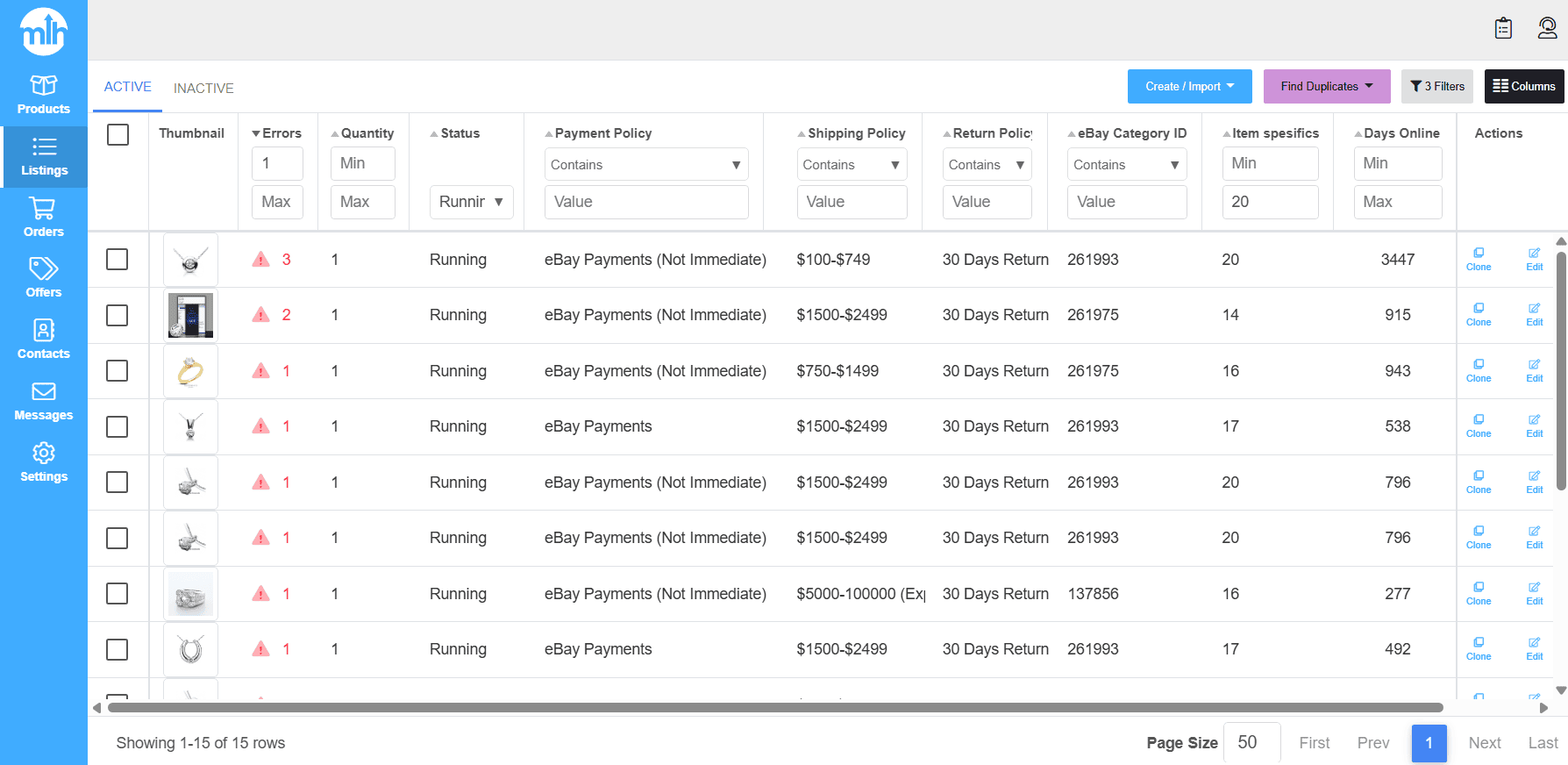
Queue B: True stale listings (8+ weeks of zero engagement)
This is the core stale listing cycle. You’re pulling listings that are truly invisible and running a controlled end-and-sell-similar routine so you can reintroduce them without wiping out your store activity.
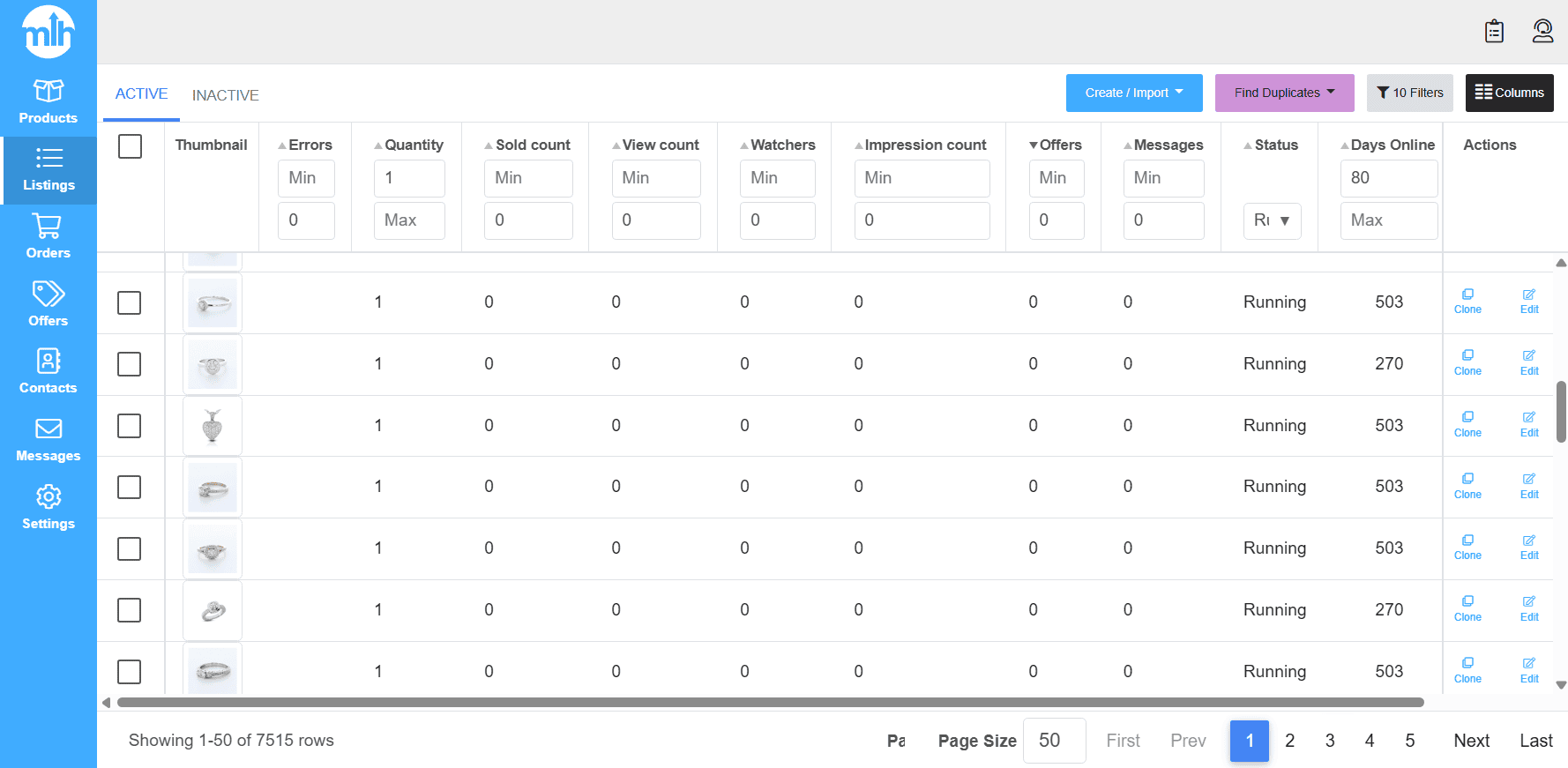
Pull this queue using a strict filter:
- Days online: 80+
- Views: 0
- Watchers: 0
- Offers: 0
- Messages: 0
- Sales: 0
- Errors: 0
- Duplicates: 0
That filter is designed to eliminate “not visible because it’s broken” listings, and isolate “not visible because it’s stale”.
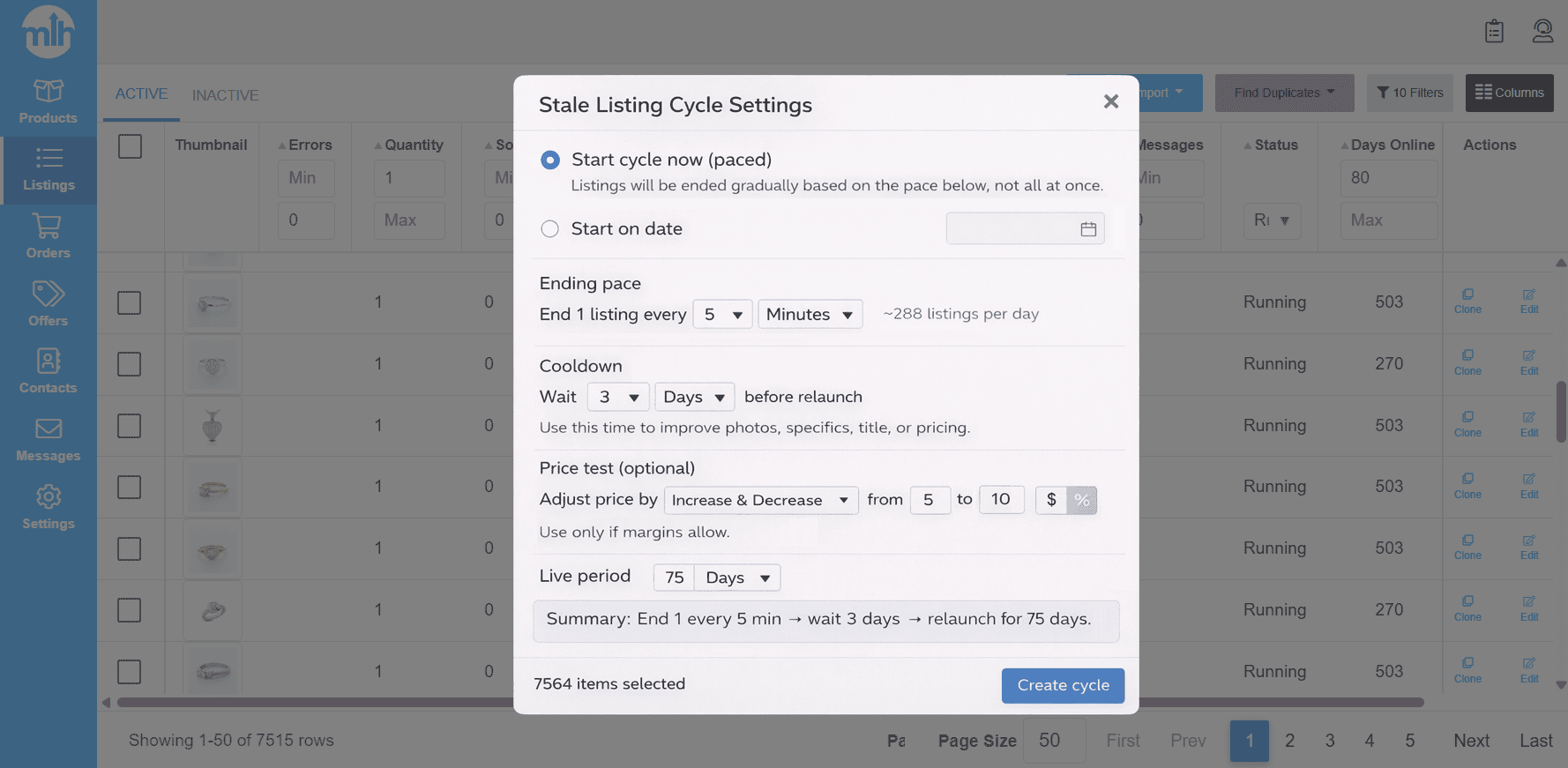
Now select all listings in that filter and create your first rule.
End in intervals (match your daily listing pace):
- Do not end more listings per day than you normally add.
- If you list about 30 items/day, a safe pace is roughly one stale listing every 1 hour.
- If you list about 250 items/day, a safe pace is roughly one stale listing every 6-7 minutes.
The exact interval is less important than the principle: you’re rotating inventory, not shrinking your catalog.
Set a cooldown before Sell Similar:
Choose how long the item should sit after it ends before it’s recreated using Sell Similar. A solid baseline is 48+ hours. Larger catalogs can use longer cooldowns to keep the cycle controlled.
Set how long each relisted item stays live before the next cycle:
Even if your eBay listings are Good ‘Til Canceled (GTC), you can still run a timed cycle where the listing stays live for a set period, then ends and is recreated again as part of your process.
Starting points (adjust to your category turnaround):
- Jewelry, rare, long-tail items: 75–90 days
- Auto parts, faster-turn inventory: 45–55 days
Add a controlled price test per cycle:
Only do this if it fits your margins. Keep it small and intentional.
- Higher markup: 5–10% range per cycle
- Tight markup: $1–$2 range per cycle
This cycle runs until the item sells or you stop it. The goal is consistent re-entry with discipline, not constant tinkering.
Queue C: High views, low conversions (seen but not selling)
Queue C is for listings that are already earning exposure. These are not “dead eBay listings”. They’re visible, but something is stopping buyers from converting. The seller mistake here is restarting them. If a listing gets strong views, your job is to identify the bottleneck and fix it in bulk.
Pull this queue:
- Views: high in the last 30–90 days (relative to your store baseline)
- Sales: 0 in the last 8 weeks
Once you have the batch, don’t assume every listing has every problem. Diagnose the most likely bottleneck, then fix that bottleneck across the batch.
Diagnose by bucket (pick the most likely one):
- Photos issue
- Price issue
- Offer strategy issue
- Shipping/returns friction
- Details and item specifics issue
Then fix in bulk based on the bucket you chose. This is where sellers actually move the needle: photo upgrades across a category, item specifics completion across a segment, policy corrections across a group, or controlled price tests across similar inventory.
If you want one line that keeps sellers disciplined, use this:
If a listing has high views, it’s alive. Treat it like a conversion problem, not a visibility problem.
Common Questions Sellers Ask:
How long should I wait before ending and selling similar?
Give every new listing a real indexing window of 1–3 weeks (7–21 days). If it still has zero traction after 21 days, fix title structure and item specifics first. Only consider End and Sell Similar when it has stayed at true zero engagement for 8+ weeks after the basics are corrected.
Will I lose watchers if I end the listing?
Yes. Watchers are tied to the original listing, so ending it will lose them.
But don’t overvalue that number. Watchers can be old, some are no longer interested, and some are competitors monitoring pricing. What matters is recent buyer activity. If the listing is still getting current views, messages, offers, or recent sales, treat it as alive and optimize conversion instead of restarting it. If it has had true zero engagement for 8+ weeks, don’t keep it alive just to “protect” old watchers. Your purpose is to sell products, not collect watchers.
Does ending listings hurt my account?
Ending fixed-price listings is a normal seller action. What creates problems is chaotic behavior: mass-ending, duplicates, and repeated relaunches with no meaningful changes. If eBay removed or hid a listing for a policy reason, fix that first before relisting.
Should I End and Relist all my eBay listings at once?
No. Bulk restarting your entire catalog creates chaos and makes it hard to track what worked. Also, in seller education sessions at eBay Open 2025, eBay cautioned that frequent end-and-relist behavior can backfire over time by resetting listing history and disrupting offsite momentum. Use End and Sell Similar only for listings you’ve confirmed are truly stale, not as a store-wide reset.
Will I lose my sales history if I Sell Similar?
Yes. Sell Similar creates a new listing, so the new listing won’t carry the old listing’s watchers or sold count. That’s why you should not restart listings that are already converting or consistently getting engagement. Use Sell Similar for true stale listings, not for listings that are still alive.
Is the number in my listing page view counter tool accurate?
No. Counter tools show lifetime totals and can include non-buyer traffic like seller/staff views, repeated checks, bots, and clicks you generated yourself. That makes a listing look “active” even if it’s had zero real engagement recently. If eBay is your only tool, use Seller Hub → Listings → Active and enable the Views column. Then judge staleness using the playbook’s last 8 weeks definition, not lifetime totals.
If you want help applying this playbook consistently
If you’re managing a serious catalog, the hard part isn’t understanding the rules. It’s running them every week without drifting into random behavior.
If you want help applying this playbook consistently:
- Book a walkthrough and we’ll map your inventory into the three paths and set up a repeatable weekly routine.
- Or Start a free trial if you want a structured way to execute the routine in batches and stay consistent as your catalog grows.

by David Green

by David Green
Get More eBay Seller Updates
Follow MyListerHub as a preferred source on Google and see more of our eBay seller news, guides, and industry updates.