Why Are My eBay Listings Getting Impressions but No Sales?
Learn why eBay listings get impressions but no sales and how to fix pricing, photos, item specifics, offers, and stale listings.
June 18, 2026
Why Are My eBay Listings Getting Impressions but No Sales?
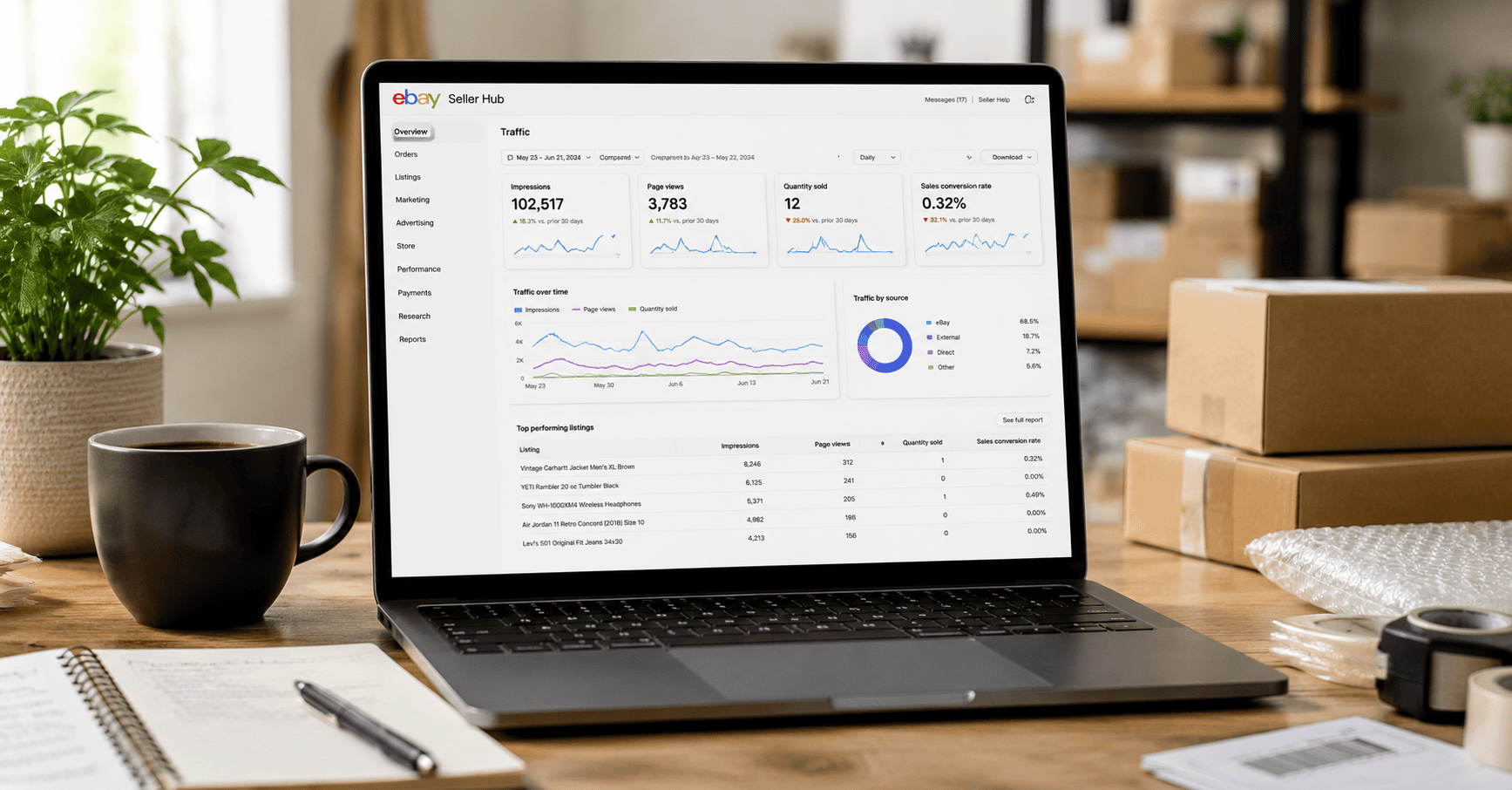
If your eBay listings are getting impressions but no sales, the problem is usually not visibility. The problem is conversion. Buyers are seeing your listings, but something about the title, photo, price, shipping, item specifics, offer strategy, or listing trust is stopping them from clicking or buying.
Fast answer: eBay listings get impressions but no sales when they are visible but not convincing enough to convert. The most common causes are weak main photos, poor titles, missing item specifics, uncompetitive pricing, high shipping costs, unclear condition notes, slow handling time, weak seller trust, no offer strategy, or stale listings that need to be revised. The fix is to audit the listing from the buyer’s perspective and improve the factors that affect click-through rate and conversion rate.
Seeing impressions but no sales on eBay is frustrating because it feels like the algorithm is giving you a chance, but buyers are not taking action. The listing is being shown. People may even be scrolling past it. But they are not clicking, watching, making offers, or purchasing.
That means this is not only an eBay traffic problem. It is a listing performance problem. And for high-volume sellers, this gets expensive fast. If hundreds of listings are getting impressions without sales, you may have inventory sitting, cash tied up, ad spend wasted, and stale listings quietly dragging down your store.
This guide breaks down why eBay impressions do not always turn into sales and how to fix the issue using a smarter listing workflow.
What Do eBay Impressions Mean?
An impression means your listing appeared somewhere a buyer could see it. This may happen in eBay search results, category pages, promoted placements, or other discovery surfaces. Impressions are important because they show that your listing has some visibility.
But impressions alone do not mean buyers are interested. They only mean the listing appeared. If buyers do not click, watch, make an offer, or buy, then your listing is failing after visibility.
Simple way to think about it:
Impressions mean your listing is being shown. Clicks mean your listing looks interesting. Sales mean your listing is trusted, priced correctly, and easy to buy.
Impressions but No Sales Usually Means One of Three Problems
When eBay listings get impressions but no sales, the issue usually falls into one of these three buckets:
| Problem Type | What It Means | What to Fix |
|---|---|---|
| Low Click-Through Rate | Buyers see your listing but do not click it. | Main photo, title, price, shipping preview, promoted placement, category relevance. |
| Low Conversion Rate | Buyers click the listing but do not buy. | Description, item specifics, trust, condition, shipping, return policy, pricing, offers. |
| Wrong Buyer Match | The listing appears for buyers who are not actually looking for that product. | Keyword targeting, category, title accuracy, item specifics, product identifiers. |
A lot of sellers make the mistake of only lowering the price. Sometimes price is the issue, but not always. If the main photo is weak, the title is confusing, or the item specifics are incomplete, lowering the price may just make a bad listing slightly cheaper.
1. Your Main Photo Is Not Strong Enough
Your main photo is one of the biggest reasons buyers either click or keep scrolling. On eBay, buyers compare listings quickly. If your image is dark, blurry, cluttered, cropped poorly, or visually weaker than competitors, you may get impressions without clicks.
For used items, the photo needs to do more than show the product. It needs to build confidence. Buyers want to understand condition, color, size, defects, packaging, included accessories, and authenticity.
Fix this by checking:
- Is the main image clear and bright?
- Does the product fill most of the frame?
- Is the background clean and not distracting?
- Does the first image look better than competitor listings?
- Do additional photos show condition, flaws, labels, model numbers, and included parts?
If the product is valuable, do not be lazy with photos. Weak photos kill trust before the buyer even reads the listing.
2. Your Title Gets Impressions but Does Not Match Buyer Intent
A title can technically get impressions while still being weak. This happens when the listing shows up for broad searches but does not match what buyers actually want to click.
A strong eBay title should include the product type, brand, model, size, color, quantity, key feature, and relevant identifiers when appropriate. A weak title is vague, stuffed with low-value words, missing model numbers, or written in a way that looks spammy.
Bad title example:
Nice Used Headphones Great Sound Works Good Fast Shipping
Better title example:
Sony WH-1000XM5 Wireless Noise Canceling Headphones Black Tested Working
The better title is specific. It gives buyers and search systems more useful information. This matters because the wrong title may attract impressions from the wrong searches while missing buyers who are ready to purchase.
3. Your Price Is Not Competitive Enough
Pricing is one of the fastest ways buyers eliminate listings. If your listing appears next to similar items that are cheaper, newer, better photographed, or offered by stronger sellers, your listing may get impressions without sales.
The mistake is assuming that your price is fair because you want a certain margin. Buyers do not care about your desired margin. They compare condition, seller trust, shipping speed, return policy, and total cost.
Before lowering price, compare:
- Sold listings, not only active listings
- Condition differences
- Shipping cost and delivery estimate
- Return policy
- Seller feedback and trust
- Whether competitors include accessories, boxes, manuals, or warranties
If competitors are cheaper and look more trustworthy, your listing needs either a better value proposition or a price correction.
4. Shipping Costs Are Creating Friction
Buyers often compare total price, not just item price. A listing with a fair item price can still lose the sale if shipping looks too expensive, too slow, or unclear.
This is especially true when your item appears in search results next to listings with free shipping, faster delivery, or cleaner shipping terms. If your shipping cost surprises the buyer, you may get impressions and clicks but lose the sale before checkout.
Check these shipping issues:
- Shipping price is higher than similar listings
- Handling time is too slow
- Delivery estimate looks uncompetitive
- International shipping is missing where relevant
- Large items are priced without clear shipping expectations
- Combined shipping is not set up for multi-item buyers
MyListerHub sellers can improve this workflow by connecting listing operations with shipping automation and order management, so shipping does not become a manual mess after the sale.
5. Missing Item Specifics Are Hurting Buyer Confidence
Item specifics are not busy work. They help buyers understand what you are selling and filter products by the attributes they care about. Depending on the category, this can include brand, model, size, color, type, material, style, compatibility, or other product details.
If your listing is missing key item specifics, it may still get impressions, but it may not look complete enough to buyers. It may also fail to appear in filtered searches where serious buyers are narrowing their options.
Common item-specific mistakes include:
- Leaving recommended specifics blank
- Using “Does Not Apply” when a real value exists
- Choosing the wrong brand, type, size, or model
- Missing MPN, UPC, ISBN, or product identifiers where relevant
- Not filling compatibility fields for auto parts
- Using inconsistent values across similar listings
If you manage many listings, manually fixing item specifics one by one is painful. Use bulk editing workflows to clean up listing data faster and protect listing quality across your catalog.
6. Your Listing Description Does Not Build Trust
Once a buyer clicks, the listing page needs to answer their questions. A thin description can make buyers hesitate, especially for used, refurbished, collectible, luxury, electronic, auto part, or high-ticket products.
A good eBay description does not need to be bloated. It needs to be clear. Buyers want to know exactly what they are getting, what condition it is in, what is included, what flaws exist, and why they should trust the listing.
Include these details when relevant:
- Exact product name and model
- Condition summary
- Testing status
- Known defects or cosmetic issues
- Included accessories
- Compatibility notes
- Shipping and handling expectations
- Return policy or buyer assurance details
If descriptions are inconsistent across your team, use templates and AI-assisted listing workflows through Photo-to-eBay Listing AI to create stronger drafts faster.
7. You Are Getting the Wrong Impressions
Not all impressions are equal. A listing can show up for broad or mismatched searches and still generate no sales. For example, if your title contains loose keywords that do not match the exact product, buyers may see your listing but ignore it because it does not fit their intent.
This is common when sellers stuff titles with too many general words or use copied titles that do not match the actual item. It is also common when listings are placed in the wrong category or missing product identifiers.
Signs you may be getting wrong impressions:
- High impressions but very low clicks
- Search terms feel too broad for the product
- The item is in a weak or incorrect category
- The title includes irrelevant keywords
- Competitor listings look more aligned with buyer searches
Fixing this often means rewriting the title, improving item specifics, choosing a better category, and making the first photo match what buyers expect to see.
8. Your Listings Are Stale
A stale listing is a listing that has been live for too long without enough buyer action. The item may still be good, but the listing needs attention. It may need better photos, a revised title, new item specifics, a price adjustment, a shipping update, or an offer strategy.
High-volume sellers often have hundreds of stale listings sitting in the background. That is dangerous because stale inventory ties up cash and warehouse space while creating the illusion that the store is full of active opportunities.
This is exactly why MyListerHub created listing cycle tools. You need a process for reviewing, improving, and taking action on listings after they go live.
9. You Are Not Using Offers Strategically
If a listing gets impressions, clicks, or watchers but does not sell, the buyer may need a reason to act. Offers can help, but only if they are used with margin discipline.
Sending offers randomly is lazy. Sending offers based on product age, margin, watcher behavior, demand, and inventory goals is much smarter.
A stronger offer strategy considers:
- How long the item has been listed
- How many watchers it has
- Current margin after fees and shipping
- How quickly you want to move the item
- Whether competitors are underpricing you
- Whether the item is seasonal or time-sensitive
Use offer management to create a more consistent process for turning interest into sales without blindly discounting everything.
10. Your Seller Trust Signals Are Weak
Buyers do not only buy the item. They buy from the seller. If your feedback, return policy, response speed, listing quality, or shipping history feels risky, buyers may choose another seller even at a higher price.
Trust matters even more for expensive, used, fragile, technical, or collectible items. If the buyer has doubts, they leave.
Improve trust by strengthening:
- Clear condition notes
- Professional photos
- Fast buyer responses
- Accurate handling time
- Transparent return policy
- Consistent product descriptions
- Clean store branding and templates
If buyer messages are slowing your team down, connect your workflow to message automation so common questions and post-sale communication do not become a bottleneck.
How to Diagnose eBay Impressions but No Sales
Do not guess. Audit the listing in order. Start where the buyer starts: search results. Then move into the listing page. Then review pricing, shipping, offers, and stale listing history.
| Audit Step | Question to Ask | Action |
|---|---|---|
| Main Photo | Would I click this image over competitors? | Retake or reorder photos. |
| Title | Does the title match exact buyer intent? | Add brand, model, type, size, color, and key identifiers. |
| Price | Is the total price competitive against sold comps? | Adjust price or improve value proposition. |
| Shipping | Does shipping look expensive or slow? | Improve shipping policy, handling time, or free shipping strategy. |
| Item Specifics | Are required and recommended details filled out? | Use bulk editing to clean up missing data. |
| Description | Does the listing answer buyer objections? | Add condition, included items, testing notes, and flaws. |
| Offers | Are watchers and interested buyers being followed up with? | Use offer management with margin rules. |
| Listing Age | Has the listing gone stale? | Review through a listing cycle workflow. |
How MyListerHub Helps Fix Listings With Impressions but No Sales
MyListerHub helps sellers move from guessing to structured action. Instead of manually reviewing every listing, sellers can build workflows around listing creation, bulk updates, stale listing review, offers, messages, orders, and shipping.
Final Answer: Why Impressions Are Not Turning Into Sales
If your eBay listings are getting impressions but no sales, buyers are seeing the listings but not feeling enough confidence or urgency to buy. The fix is not always more ads or lower prices. The fix is better listing execution.
Start with the main photo, title, price, shipping, item specifics, description, and seller trust. Then review stale listings and build a better offer strategy. If you manage a large catalog, do not try to fix everything manually. Use a real listing workflow so your team can improve listings at scale.
Impressions are only the first step. The money is made when your listings earn the click, answer the buyer’s objections, and make the purchase feel obvious.
Turn eBay Impressions Into Sales With Better Listing Workflows
MyListerHub helps eBay sellers improve listing quality, automate repetitive tasks, manage stale listings, send smarter offers, and scale with more control.
Frequently Asked Questions
Why are my eBay listings getting impressions but no sales?
Your listings are getting impressions but no sales because buyers are seeing them but not converting. Common reasons include weak photos, poor titles, uncompetitive pricing, missing item specifics, high shipping costs, unclear descriptions, weak seller trust, or stale listings.
Are eBay impressions good?
Yes, impressions are a good sign because they mean your listing is being shown. However, impressions alone do not create revenue. You still need buyers to click, trust the listing, and complete the purchase.
What is a good click-through rate on eBay?
A good click-through rate depends on category, price, product demand, and competition. Instead of chasing one universal number, compare similar listings and focus on improving your main photo, title, price, and shipping preview.
Should I lower my price if I get impressions but no sales?
Not immediately. First check photos, title quality, item specifics, shipping cost, description, condition notes, and competitor listings. Lowering price helps only if price is the actual reason buyers are not converting.
Can promoted listings create impressions without sales?
Yes. Promoted listings can increase visibility, but visibility does not guarantee sales. If the listing has weak photos, poor pricing, bad shipping terms, or low trust, more impressions may simply expose the same conversion problem to more buyers.
How can MyListerHub help with eBay listings that do not sell?
MyListerHub helps sellers improve listing workflows through bulk editing, AI listing creation, listing cycle management, offer management, message automation, order management, and shipping automation.
Helpful external resources: eBay Create Great Listings, eBay Item Specifics, eBay Photo Tips, eBay Promoted Listings.

by Jack Blum
Jack has been selling on eBay since 2002, with deep roots in the automotive and DTC space. His experience comes from running real operations at scale, managing complex parts inventory, fitment accuracy, and customer expectations. He shares practical insights based on what actually works for long-term growth on eBay.
by Jack Blum
Jack has been selling on eBay since 2002, with deep roots in the automotive and DTC space. His experience comes from running real operations at scale, managing complex parts inventory, fitment accuracy, and customer expectations. He shares practical insights based on what actually works for long-term growth on eBay.
Get More eBay Seller Updates
Follow MyListerHub as a preferred source on Google and see more of our eBay seller news, guides, and industry updates.