How eBay Fitment Plus and MyListerHub Work Together for Professional Auto Parts Sellers
See how eBay Fitment Plus and MyListerHub work together to help professional auto parts sellers manage compatibility, internal fitment data, returns, and large catalogs.
August 16, 2026
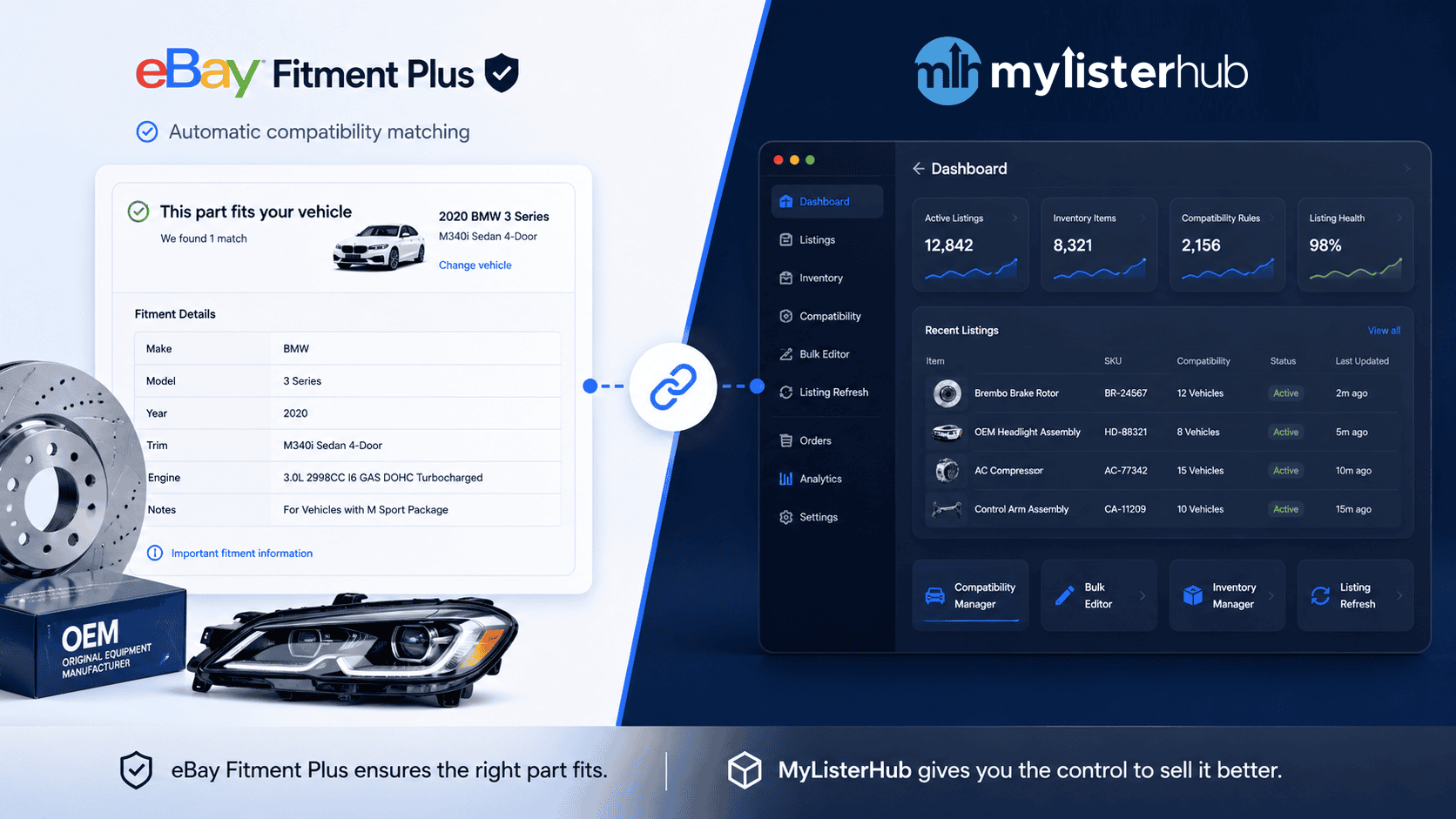
Using MyListerHub Alongside eBay Fitment Plus for Large Auto Parts Catalogs
If eBay already has Fitment Plus, why would a professional auto parts seller need another fitment management tool?
The answer is simple: eBay Fitment Plus and MyListerHub solve different parts of the same problem.
Fitment Plus helps eBay determine which vehicles a part should fit and can automatically add or update compatibility on eligible listings. MyListerHub works alongside that system by giving professional sellers more control and flexibility over their own compatibility data, internal records, exceptions, bulk operations, and the listings and inventory associated with that fitment.
For a seller with a few hundred straightforward replacement parts, eBay’s native tools may handle much of the work.
But a manufacturer, OEM dealer, salvage yard, New Old Stock seller, aftermarket business, or used-parts operation managing 5,000 or 500,000 listings has a very different problem.
At that scale, fitment is no longer just a field inside an eBay listing.
It becomes part of the company’s catalog infrastructure.
What eBay Fitment Plus Does
eBay Fitment Plus helps connect auto parts with compatible vehicles.
When eBay has enough product information, particularly details such as brand and manufacturer part number, it can use its compatibility database to determine which vehicles may fit that product.
Fitment Plus is eBay’s system for matching parts with compatible vehicles. Fitment Plus Auto takes that a step further by allowing eBay to automatically add or update that compatibility on eligible listings.
For many standardized products, this can remove a substantial amount of manual research.
Accurate compatibility can also help a listing appear when a buyer searches for their vehicle, increase buyer confidence, and support eligible listings that participate in eBay Guaranteed Fit.
That makes Fitment Plus valuable.
But it does not mean eBay knows everything your business knows about every part you sell.
Still using myFitment? eBay is shutting down the standalone service on September 30. See what is changing, what sellers should prepare for, and why the deadline matters for large auto-parts catalogs.
eBay Has Its Data. Professional Sellers Have Their Own Data Too.
This is one of the biggest differences between a marketplace compatibility system and an experienced professional auto parts operation.
Many established sellers have spent years, or decades, building their own fitment information.
That data may exist in:
- internal databases,
- spreadsheets,
- CSV files,
- manufacturer records,
- supplier catalogs,
- interchange information,
- old inventory systems,
- employee knowledge,
- custom software built specifically for their business,
- their head.
The problem is that most of this data never reaches the eBay listing itself.
Employees may use an internal spreadsheet to answer questions or to research whether a part fits a specific vehicle, while eBay continues to display a completely separate compatibility table.
In other words, some of the seller’s most valuable fitment knowledge remains isolated from the marketplace where the product is being sold.
Bringing Internal Fitment Data Into the Listing Workflow
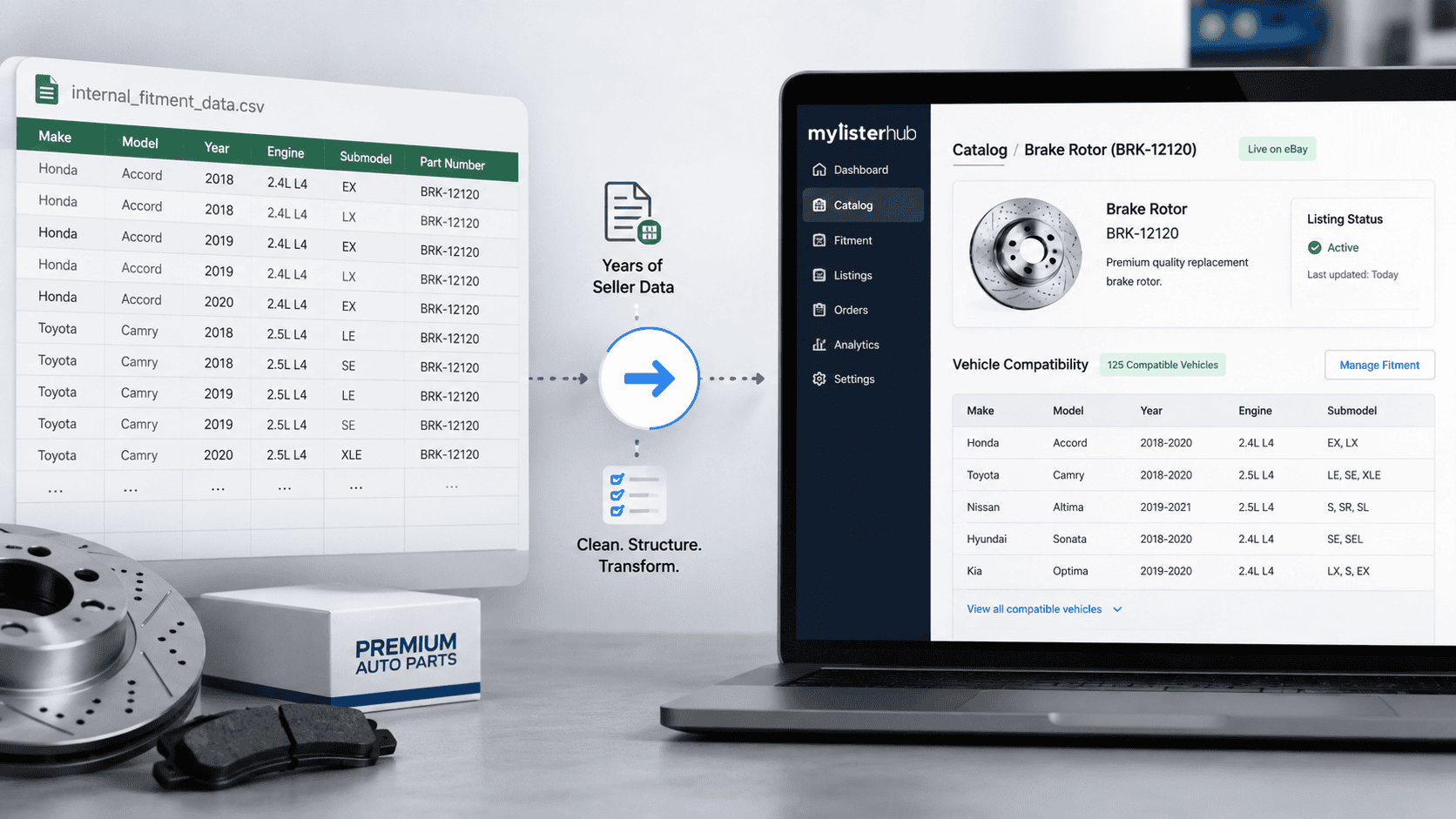
MyListerHub allows professional sellers to bring internal compatibility information into their fitment workflow through CSV imports.
Instead of keeping years of internal data as a separate reference used only by employees, sellers can connect that information with the products and listings it belongs to.
This is particularly valuable for businesses that have already invested significant time building their own compatibility records.
A seller should not have to abandon years of internal knowledge simply because a marketplace has its own database.
The better approach is to use both.
Use eBay’s compatibility intelligence where it helps, while preserving and applying the seller’s own verified data.
Fitment Does Not Stay the Same Forever
Another major problem with compatibility is that it is not static.
A seller may create a listing today and attach every vehicle currently known to fit the part.
That does not mean the fitment is complete forever.
Consider a part listed when 2026 vehicles are the newest models in the market.
A year later, manufacturers release their 2027 vehicles.
If the same part is also used on the 2027 model, the listing should ideally gain that additional compatibility.
Otherwise, the product may still be sitting on eBay, perfectly capable of fitting the newer vehicle, while buyers searching specifically for that 2027 model may never see it as compatible.
For a catalog containing tens of thousands of products, manually revisiting every listing each time a new vehicle model enters the market is unrealistic.
Compatibility management therefore needs to be an ongoing process, not a one-time task performed when the listing is created.
MyListerHub helps professional sellers maintain and update compatibility as catalogs and vehicle applications evolve.
That creates another way MyListerHub can work alongside eBay Fitment Plus: eBay can provide marketplace compatibility information while the seller maintains control over additional applications and internal fitment knowledge.
Sometimes Fitment Needs to Be Removed, Not Added.
Most fitment systems focus heavily on adding more vehicles.
But more compatibility is not always better.
More accurate compatibility is better.
Imagine a seller has a part listed as compatible with 150 different vehicles.
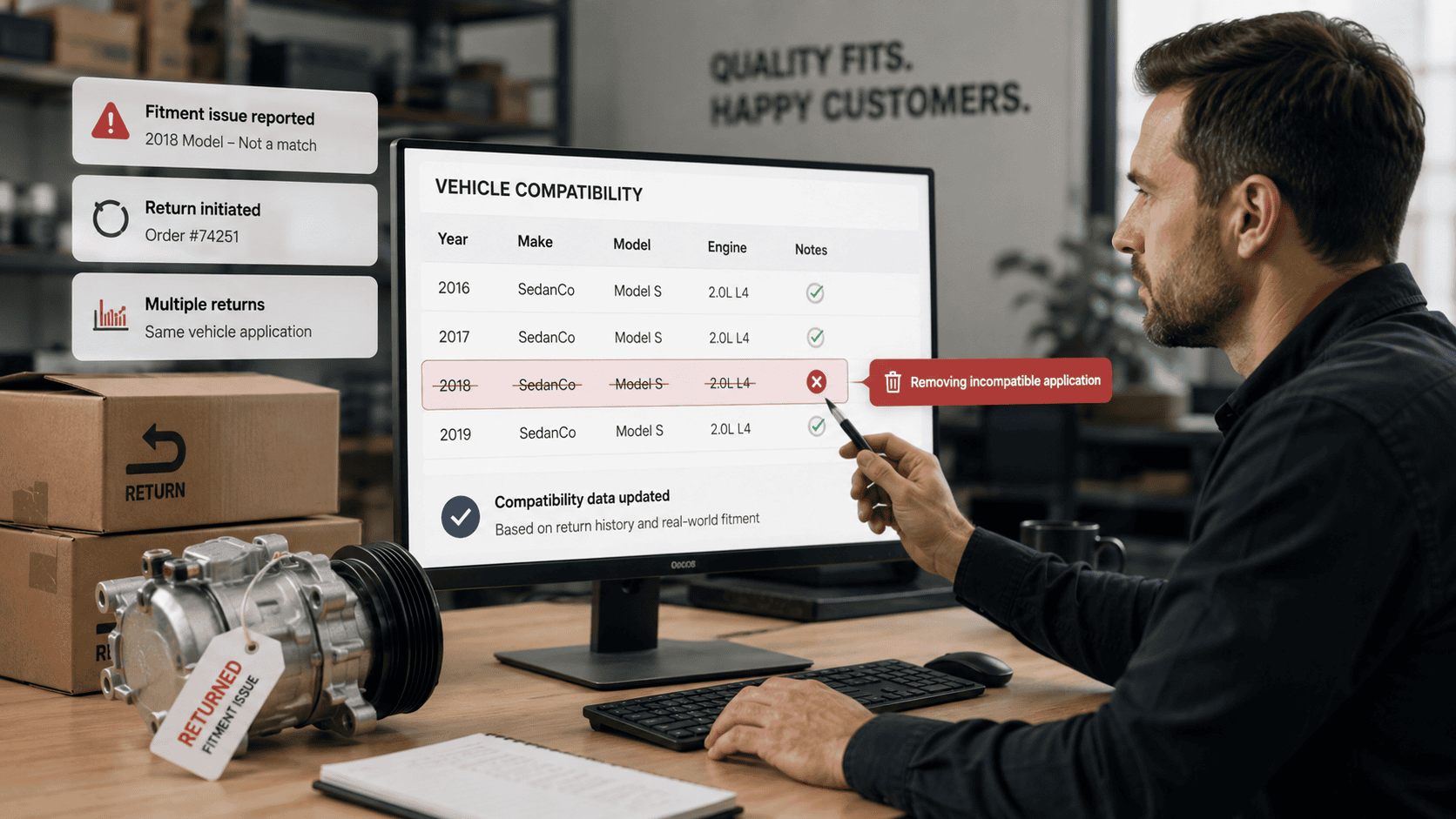
One particular vehicle repeatedly generates “doesn’t fit” returns.
Perhaps a certain trim uses a different component.
Maybe there was a production-month change.
Maybe one engine configuration is different.
Or perhaps the catalog information simply does not reflect what sellers are seeing in the real world.
After multiple returns from the same vehicle, the seller has learned something valuable.
That vehicle should probably no longer be listed as compatible until the issue is investigated.
MyListerHub allows sellers to remove specific compatibility applications when their own operational experience indicates that the fitment is causing problems.
That gives professional sellers an important layer of control.
Marketplace data can tell you what should fit.
Your return history can tell you what is actually happening.
Both matter.
Returns Can Become Fitment Intelligence
Professional sellers accumulate valuable information every day simply by operating their business.
Returns are one example.
If one vehicle application repeatedly generates fitment-related returns while dozens of other applications do not, that pattern deserves attention.
The same is true for buyer communication.
If employees repeatedly need to investigate the same vehicle configuration, there may be an underlying compatibility issue that needs to be corrected.
For a large seller, this turns fitment into more than catalog data.
It becomes operational intelligence.
The seller needs to be able to identify the problem, verify compatibility, and remove or correct the specific application, rather than blindly continuing to advertise the part for that vehicle.
That can reduce unnecessary returns, buyer frustration, customer service workload, and the risk of negative feedback.
Combine Compatibility From Multiple Parts Into One Listing
Sometimes a seller already knows that compatibility from one part should also apply to another.
For example, Part A may have one compatibility list and Part B may have a different one. Based on the seller’s own product knowledge and experience, Part A’s vehicle applications may also fit Part B.
Rebuilding that compatibility manually can be extremely time-consuming, especially when hundreds or thousands of vehicle applications are involved.
MyListerHub allows sellers to copy or merge compatibility from one part into another while preserving the compatibility already attached to the destination listing.
That means the seller does not have to replace Part B’s existing fitment just to add applications from Part A. The two compatibility groups can be combined, reviewed, and adjusted as needed.
For large catalogs, this can turn hours of repetitive compatibility entry into a much faster bulk workflow.
Find Compatibility From Similar eBay Listings
Professional sellers also frequently research other listings when determining the correct compatibility of a part.
MyListerHub makes that research part of the fitment workflow.
Sellers can search for related eBay listings using information such as:
- brand+year
- eBay Item ID,
- item name,
- and other product information.
MyListerHub then shows a list of relevant listings, along with useful details such as the seller ID and the number of vehicle compatibility attachments for each listing.
This lets the seller quickly identify listings that may contain useful fitment data, rather than opening them one by one.
From there, the seller can import the compatibility as a starting point, review it, remove applications that do not apply, and modify the list based on their own product knowledge.
eBay Knows the Marketplace. You Know Your Parts.
This is the simplest way to understand how MyListerHub and eBay Fitment Plus work together.
eBay has marketplace-scale compatibility data.
Professional sellers have business-specific knowledge.
That seller knowledge can include:
- VIN-specific exceptions,
- production-month differences,
- trim differences,
- drivetrain differences,
- OEM supersession chains,
- multiple OEM numbers for the same part,
- verified interchange information,
- manufacturer corrections,
- salvage-yard knowledge,
- vintage applications,
- internal compatibility databases,
- and patterns discovered through actual sales and returns.
A marketplace database cannot automatically know every exception that an experienced parts operation has learned over thousands of transactions.
That does not make eBay’s data useless.
It means the strongest workflow can combine marketplace data with seller-controlled data.
What MyListerHub Adds Alongside Fitment Plus
The difference becomes clearer when we look at what happens after compatibility data exists.
- Seller-Controlled Fitment
Professional sellers can review, edit, add, and remove compatibility instead of treating marketplace data as something they cannot influence.
- Internal Data Imports
Existing fitment records stored in spreadsheets or internal systems can be imported via CSV and linked to active catalog data.
- Bulk Compatibility Management
Changes can be applied across larger groups of products rather than forcing employees to edit listings one by one.
- New Vehicle Applications
Compatibility can continue evolving as newer model years enter the market and existing parts gain additional vehicle applications.
- Removing Problem Applications
If a particular vehicle repeatedly results in fitment-related returns, sellers can remove that compatibility rather than continue to advertise the same questionable application.
- Complex Inventory
MyListerHub is designed around catalogs that may include OEM parts, aftermarket products, used parts, salvage inventory, vintage parts, New Old Stock, superseded numbers, and custom compatibility information.
That is where professional fitment management becomes substantially different from simply choosing vehicles from a compatibility table.
Want to see the full fitment system in one place? Explore MyListerHub’s Auto Parts Fitment & Compatibility platform, including bulk management, internal data imports, compatibility controls, and large-catalog workflows.
Fitment Also Has to Work With the Listing
Compatibility does not exist in isolation.
The part has:
- a title,
- description,
- condition,
- price,
- inventory quantity,
- images,
- SKU,
- item specifics,
- listing template,
- and marketplace history.
That is why MyListerHub does not treat fitment as an entirely separate part of the seller’s operation.
Fitment & Compatibility Management sits alongside the broader listing workflow.
A seller can manage compatibility while also working with inventory, listings, bulk operations, HTML templates, and other eBay-management tools.
This becomes particularly useful for professional businesses that would otherwise need multiple disconnected systems for different parts of their eBay operation.
What About Aging Auto Parts Listings?
Auto parts frequently have a long sales cycle.
A component may be valuable, have completely valid compatibility, and fit dozens or hundreds of vehicles; but still remain unsold for six, nine, or twelve months.
That is not necessarily a fitment problem.
It may be a listing-management problem.
MyListerHub’s Listing Cycles allow sellers to create rules for refreshing aging inventory rather than leaving stale listings untouched indefinitely.
This is another example of why fitment is only one part of operating a professional eBay parts catalog.
Fitment Plus can help tell eBay who the part fits.
MyListerHub can help manage what happens to the listing over its entire lifecycle.
A 35,000-Listing Salvage Yard Is a Different Business
Consider a salvage operation with 35,000 active eBay listings.
eBay Fitment Plus can help add compatibility to eligible products.
That is useful.
But the business may also have ten years of internal interchange records sitting in its own database.
Its employees may know that one OEM number was superseded twice.
They may know that a particular application changed halfway through a production year.
They may see that one vehicle repeatedly generates “doesn’t fit” returns.
They may have listings created several years ago that need newer model-year compatibility added.
And they may have thousands of products that have been sitting on eBay for months without selling.
Those are not all problems Fitment Plus was designed to solve.
They are catalog-management problems.
That is where using MyListerHub alongside Fitment Plus becomes more valuable.
Who Needs This Kind of Fitment Workflow?
Not everybody.
A seller with a few hundred simple, standardized replacement parts may be perfectly comfortable using eBay’s native compatibility tools.
The need for additional control increases as catalogs become larger and more complicated.
MyListerHub Fitment & Compatibility Management is particularly relevant to:
- OEM dealers,
- auto parts manufacturers,
- salvage yards,
- aftermarket sellers,
- used-parts businesses,
- New Old Stock sellers,
- vintage-parts sellers,
- and professional sellers managing large catalogs.
The core MyListerHub fitment audience is approximately 5,000 to 50,000 listings, although the platform can support sellers with as few as 1,000 listings and enterprise operations with more than million listings.
At those sizes, saving a few minutes on a single listing is not the primary objective.
The objective is building a workflow that can manage compatibility across the entire catalog.
Need to move off myFitment before September 30? See how MyListerHub can import your existing fitment data and help you migrate without having to rebuild your compatibility catalog from scratch.
Using MyListerHub Alongside eBay Fitment Plus
The choice does not have to be MyListerHub or eBay Fitment Plus.
For many professional sellers, the better question is how the two can work together.
eBay Fitment Plus can provide marketplace-level vehicle compatibility and automation.
MyListerHub can add:
- the seller’s internal compatibility data,
- bulk management,
- seller-controlled corrections,
- new model-year updates,
- removal of problematic applications,
- complex catalog management,
- and the broader listing and inventory workflow surrounding the part.
That combination acknowledges something professional auto parts sellers already understand:
No single database knows everything about every part.
eBay has enormous marketplace and compatibility resources.
But the seller may have decades of product knowledge, internal records, return history, and real-world experience that eBay does not.
The strongest fitment workflow should not force the seller to choose one source and ignore the other.
It should allow both to work together.
And as auto parts catalogs grow larger, more complex, and more automated, maintaining seller control becomes increasingly important.
Common Questions eBay Auto Parts Sellers Ask About eBay Fitment Plus and Vehicle Compatibility
What is the best way to manage eBay Fitment Plus for a large auto parts catalog?
For professional sellers, the best approach is usually to combine eBay’s compatibility automation with a system that gives the seller control over bulk edits, internal fitment data, exceptions, and catalog-wide updates. This becomes more important when managing thousands of listings instead of a small parts inventory.
Can I use my own CSV fitment data with eBay vehicle compatibility?
Yes. Many professional auto parts sellers already have valuable compatibility data stored in spreadsheets, CSV files, supplier records, or internal databases. MyListerHub can bring that data into the fitment workflow so it can be connected to active listings instead of remaining separate from eBay.
How can I remove incorrect eBay fitment after repeated “doesn’t fit” returns?
If one specific vehicle application repeatedly causes fitment-related returns, professional sellers should review and remove that compatibility instead of continuing to rely on the same marketplace data. MyListerHub gives sellers more control over individual compatibility applications and lets them adjust fitment based on real-world return experience.
Do professional eBay auto parts sellers still need fitment software if they use Fitment Plus?
For simple catalogs, eBay Fitment Plus may handle much of the compatibility work. Large or complex sellers may need more control over internal data, bulk compatibility, OEM supersessions, used and salvage parts, new model-year updates, and problem applications. That is where a dedicated fitment-management layer becomes more useful.

by Jack Blum
by Jack Blum
Get More eBay Seller Updates
Follow MyListerHub as a preferred source on Google and see more of our eBay seller news, guides, and industry updates.